Naver Map vs Google Maps in Korea: Why Google Doesn't Work (And What to Use Instead) [2026 Guide]
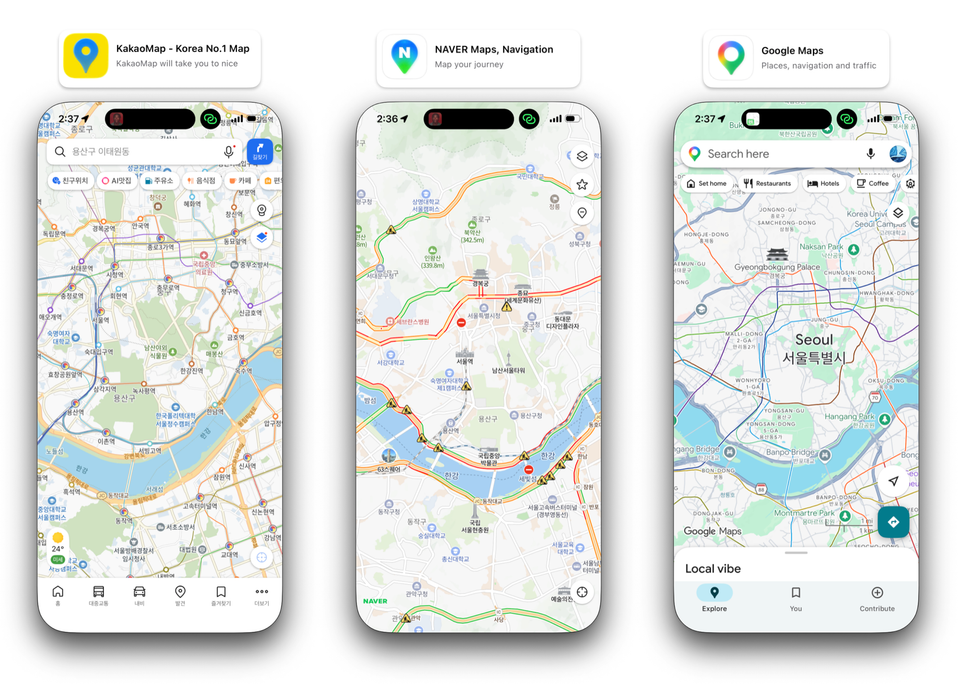
If you're planning a trip to South Korea — or you just landed and your Google Maps is acting weird — there's something nobody warned you about: Google Maps barely works in Korea.
Walking directions? Mostly missing. Driving routes? You can't get them. Public transit? Hit or miss. That restaurant Google says is "open"? Closed two years ago.
This isn't a glitch. It's a structural problem that's been around for over a decade. The good news: Korea has two homegrown map apps that work brilliantly — Naver Map and Kakao Map. After years of using both daily, here's everything you need to know to pick the right one and use it like a local.
TL;DR — Which Map App Should You Use in Korea?
For most people: Download Naver Map. It's the most accurate, has the best public transit info, and is the closest thing Korea has to "the default map app."
For meeting friends in busy areas: Use Kakao Map for its real-time location sharing.
For Google Maps: Keep it for general orientation only. Don't rely on it for directions.
You can — and probably should — install all three. They each shine in different situations.
See the Difference for Yourself
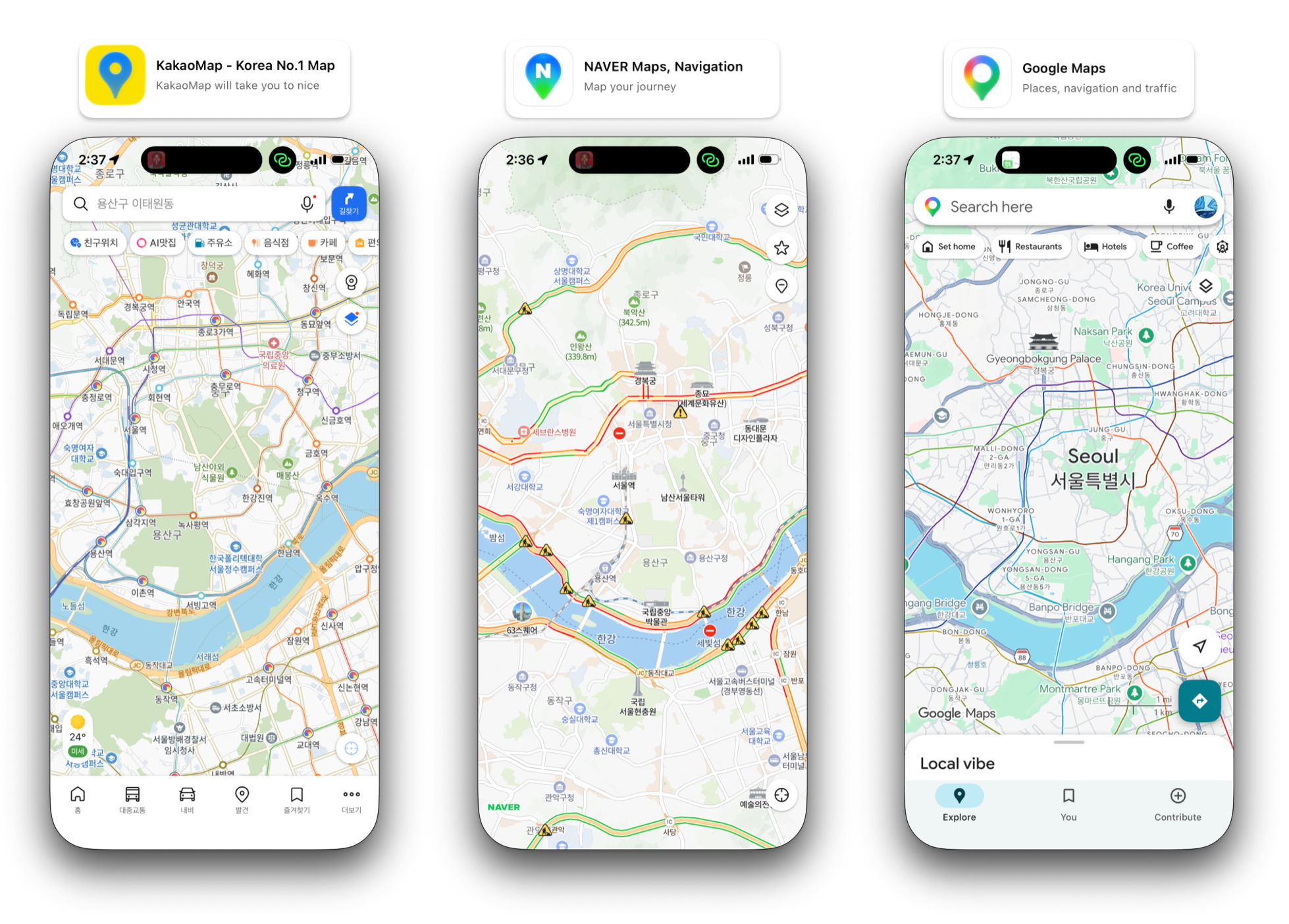
The image above shows the same area of central Seoul on Kakao Map, Naver Map, and Google Maps — at the same time, on the same phone. Notice the difference?
Naver and Kakao show the city the way Koreans see it: detailed streets, building names, subway exits, business locations, even traffic conditions in real time. Google Maps shows you... a basic outline. Some major roads. The Han River. That's it.
This isn't Google being lazy. There's a specific reason it can't do better — and once you understand why, you'll know exactly which app to use for what.
Why Doesn't Google Maps Work in Korea?
This trips up almost every visitor, so let's clear it up first.
South Korea has a map data export law dating back to the 1960s, originally created for national security reasons. Detailed mapping data of South Korean territory cannot legally be exported to servers outside the country. Google's mapping infrastructure runs primarily on overseas servers, which means Google has never been allowed to use Korea's full map data the way it does in other countries.
The Korean government has periodically reviewed Google's request to access this data, and as of 2026 the restriction is still in place. Naver and Kakao, as Korean companies operating Korean servers, have full access to the data.
What this means in practice:
- Walking directions: Largely unavailable on Google Maps in Korea
- Driving directions: Not available at all
- Public transit: Works in Seoul, less reliable elsewhere
- Business info: Often outdated — wrong hours, closed restaurants still listed as open, missing new places
- Place search: Many Korean businesses don't appear, or appear with English translations that nobody actually uses
It's not that Google is broken. It's that Google is missing half the map.
Meet Naver Map: The Default Map of Korea
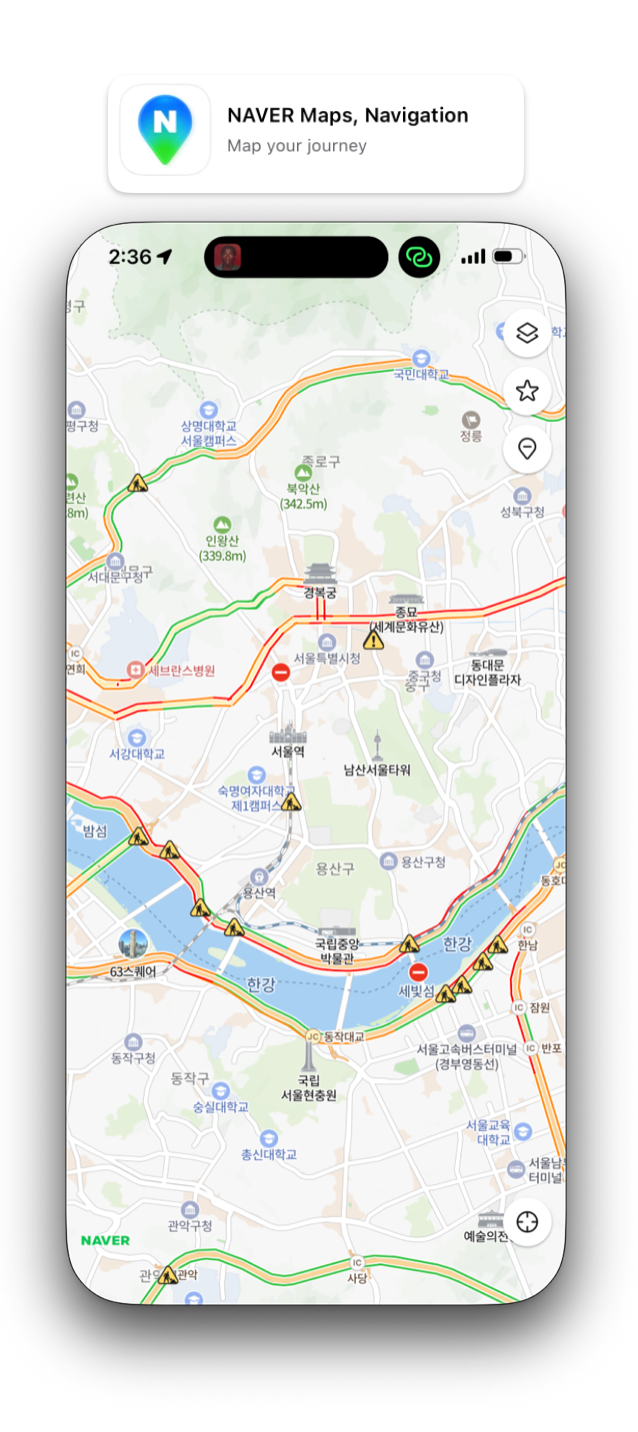
If you ask any Korean which map app they use, 9 out of 10 will say Naver Map (네이버 지도). Naver is essentially "Korean Google" — a search engine, news portal, and ecosystem that most Koreans use daily. Naver Map is part of that ecosystem, which is why it's so deeply integrated with everything else in Korean life.
Here's what makes it the go-to choice:
1. Real-Time Public Transit That Actually Works
This is the killer feature. Naver Map tells you exactly when the next bus or subway is arriving down to the minute. Not estimated. Actual real-time data pulled from Seoul's transit system.
Standing at a bus stop wondering if you should keep waiting or just call a taxi? Naver Map will tell you "next bus in 3 minutes." Heading to the subway? It'll show you the exact arrival time of the next train, which car to board to be closest to your transfer or exit, and how long the whole journey will take.
For anyone navigating Korean public transit — which is excellent, by the way — this alone makes Naver Map essential.
2. Trustworthy Restaurant Reviews (Receipt-Verified)
Restaurant reviews everywhere are getting harder to trust. Fake reviews, paid reviews, bots — it's a mess. Naver solves this with a simple but powerful system: you can only leave a verified review if you upload a receipt from the restaurant.
Naver runs frequent promotional events to encourage diners to write these verified reviews, so popular restaurants accumulate hundreds or thousands of legitimate reviews from people who actually ate there. When you see a Korean restaurant with 500+ verified reviews on Naver Map, you can trust the rating in a way you simply can't with Google or TripAdvisor in Korea.
One caveat: Naver does run paid recommendations that appear at the top of search results, marked as ads. Scroll past those and you're in trustworthy territory.
3. Pop-Up Stores and Trending Spots
Korea has a thriving pop-up store culture — limited-time concept shops, brand activations, café collaborations — and they all show up on Naver Map. If you've heard about a viral pop-up from Instagram or TikTok, just search the brand name on Naver Map and you'll find it. Google Maps almost certainly won't have it listed.
4. CarPlay and Android Auto Integration
If you're renting a car in Korea, this matters. Naver Map plays nicely with Apple CarPlay and Android Auto — the navigation hands off cleanly from your phone to the car display, the voice prompts work in English (or Korean), and the routing is accurate.
The same can't be said for Google Maps in Korea, which often refuses to give driving directions at all.
5. Indoor Maps for Big Buildings
Most large department stores, train stations, malls, and even some hospitals have indoor maps in Naver. You can see exactly which floor a store is on, the layout of food courts, where bathrooms are. For places like Hyundai Department Store or Coex Mall (which is genuinely confusing), this is incredibly useful.
Meet Kakao Map: The Social Map
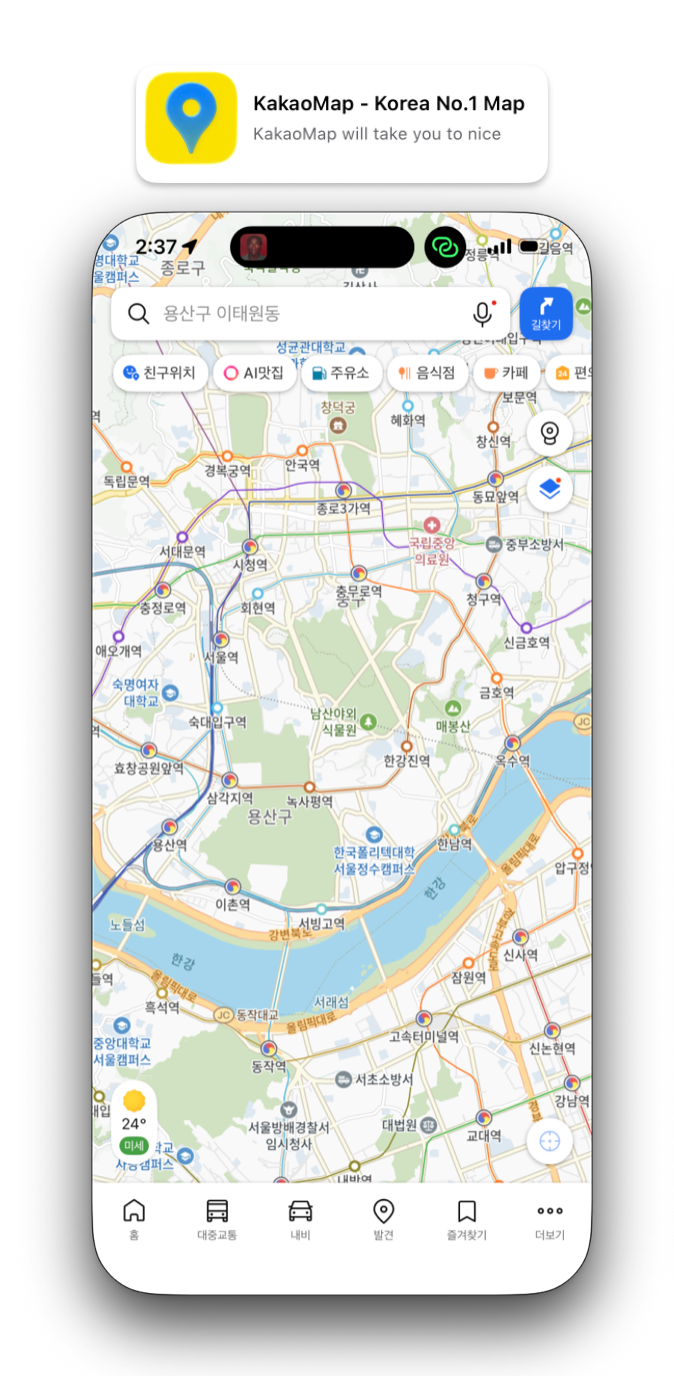
Kakao Map (카카오맵) is the second major player. It's owned by Kakao, the company behind KakaoTalk — Korea's dominant messaging app. Almost everyone in Korea has KakaoTalk, which makes Kakao Map's signature feature so useful.
What Kakao Map Does Best: Real-Time Location Sharing
Meeting friends at a busy spot like Hongdae or Gangnam Station? Kakao Map's location-sharing feature is invaluable.
How it works:
- Open Kakao Map → tap the location-sharing icon
- Share your live location with specific friends from your KakaoTalk contacts
- Set a custom time limit — share for 15 minutes, 1 hour, until you arrive, etc.
- Everyone in the group can see where everyone else is on the way
- Sharing automatically stops when the time runs out
It's privacy-respecting (you choose exactly who and how long), and it eliminates the endless "where are you?" texts. Whoever arrives first knows whether to grab a table or wait outside.
This feature is why a lot of Korean friend groups default to Kakao Map for any group meet-up, even if they normally use Naver Map for navigation.
Other Kakao Map Strengths
- Cleaner interface: Some people prefer Kakao Map's design — less cluttered than Naver Map
- Good for taxi calls: Integrates well with Kakao T (Korea's main taxi/ride-hailing app)
- Bicycle routes: More detailed bicycle path mapping than Naver
- English support: Slightly more polished English UI than Naver Map
When to Still Use Google Maps in Korea
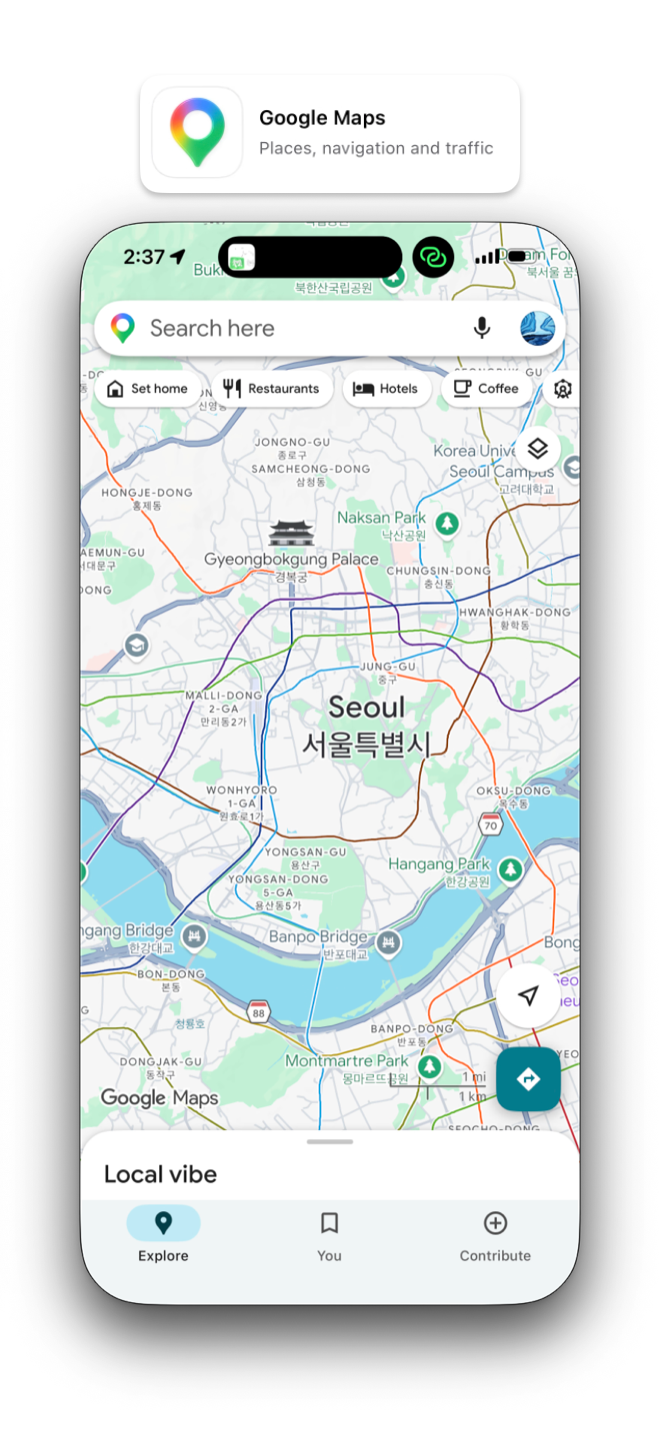
Google Maps isn't useless in Korea — it just isn't your navigation tool. Here's when it still helps:
- Planning before you arrive: Browsing where things are roughly located, looking at neighborhoods on satellite view
- Saving places you want to visit: Pin restaurants and attractions to your Google account so you have them as a reference list
- Reading reviews from other foreigners: Google reviews skew international, so they're useful for getting a non-Korean perspective on a place
- Finding embassy and government info: These are usually accurate on Google
- Looking up basic info abroad: When you fly home, Google Maps starts working normally again
Just don't try to navigate with it once you're on the ground.
How to Download and Set Up Naver Map (Step by Step)
Step 1: Download the App
- iPhone: Search "Naver Map" in the App Store
- Android: Search "Naver Map" in Google Play Store
- The app icon is white with a green and blue "N"
Step 2: Switch to English (Optional)
The app opens in Korean by default. To switch:
- Tap the menu icon (three lines) in the top left
- Tap the gear icon for settings
- Find Language and select English
The English version covers most features, but some restaurant reviews and detailed local info will still be in Korean. That's where translation apps like Papago (also by Naver) come in handy.
Step 3: You Don't Need an Account to Use It
You can start using Naver Map immediately without signing up. Account creation requires a Korean phone number and is genuinely difficult for foreigners — skip it.
The downside: you can't save favorite places to your account. Workaround: use Google Maps as your "favorites list" for trip planning, and Naver Map for actual navigation.
Step 4: Test It
Try searching for a few places to see how it works:
- A famous spot:
Gyeongbokgung Palace - A neighborhood:
Hongdae - A subway station:
Gangnam Station - A restaurant: type the name in English or Korean
Try getting directions from your hotel to a destination. The transit options will appear with real-time arrival times — that's the magic.
How to Download and Set Up Kakao Map
Step 1: Download
- iPhone: Search "Kakao Map" in the App Store
- Android: Search "Kakao Map" in Google Play Store
- The app icon is yellow with a black map pin
Step 2: Sign in with Kakao Account (Optional)
You can use Kakao Map without an account, but to use the location-sharing feature you'll need a Kakao account, which means having KakaoTalk installed.
If you're staying in Korea for more than a few days, getting KakaoTalk is genuinely useful — most Koreans communicate exclusively through it, restaurants take reservations through it, and many businesses use it as their primary contact channel.
Step 3: Enable Location Permissions
Both apps need location access to work. When prompted, allow location services. For best accuracy, allow location "Always" or "While Using App."
Pro Tips Foreigners Don't Know
1. Use Naver Map's Real-Time Subway Info to Pick Your Subway Car
When you tap a subway route in Naver Map, it shows which car to board to be closest to:
- The exit you want at your destination station
- The transfer to your next line
This sounds minor but saves serious time and walking, especially in massive stations like Seoul Station or Gangnam.
2. Save Your Address in Hangul
Korean addresses written in English don't always translate cleanly. If you're staying somewhere for a while, ask your host for the Korean address (한국어 주소) and save it as a screenshot. Paste it into Naver Map's search and you'll get exact directions home.
3. Use Pojangmacha & Street Food Search
You can search for "포장마차" (pojangmacha — street food tents) on Naver Map and find the late-night drinking and snacking spots that locals love. These rarely appear on Google Maps.
4. Filter Restaurants by "Open Now"
Both Naver and Kakao let you filter "currently open" restaurants — essential late at night or on holidays when many places close unexpectedly.
5. Check the Reviews for Photos, Not Just Stars
Korean reviewers are obsessive about food photography. Even if you can't read the Korean text, scrolling through user-uploaded photos of the actual menu items is a great way to decide what to order.
Frequently Asked Questions
Does Google Maps work at all in Korea?
It works for basic place search and reading reviews, but not for navigation. You can see a map of Seoul, but you can't get walking, driving, or reliable transit directions for most journeys.
Is Naver Map free?
Yes, completely free. No subscription, no ads beyond the labeled "promoted restaurant" results.
Do I need a Korean phone number to use Naver Map?
No. You can use the app without creating an account. You only need an account if you want to save favorite places.
Can I use Naver Map offline?
Limited offline functionality. You'll want a working data connection — get a Korean SIM card or eSIM as soon as you arrive.
Which app do tourists usually use?
Most foreign visitors who do their research switch to Naver Map within a day or two of arriving. Tourists who don't research stay confused trying to use Google Maps the whole trip.
What about Apple Maps?
Apple Maps has the same legal restrictions as Google Maps in Korea. Limited to non-existent navigation. Don't rely on it.
Is the English in Naver Map any good?
It's good enough for navigation. Place names, street names, and main interface are all in English. Some review content and detailed business descriptions will still be in Korean — use Papago to translate.
The Bottom Line
If you're coming to Korea: download Naver Map before you fly. It's free, it's accurate, it has world-class public transit info, and it's how Korea actually navigates itself.
Add Kakao Map if you'll be meeting up with friends and want easy location-sharing.
Keep Google Maps for trip planning and saving places, but don't trust it for navigation.
You'll catch on faster than you think. Within a few days you'll be reading Naver Map like a local, and you'll wonder how anyone navigates Korea any other way.
Have a question about navigating Korea, or know a Naver Map trick we didn't cover? Email us at hello@konnectinkorea.com — we love hearing from readers.
Want practical guides like this delivered to your inbox? Subscribe to the Konnect In Korea newsletter for weekly tips on living, working, and exploring Korea as a foreigner.